How to Download TikTok Slide Images?

TikTok is often associated with short, viral videos, but in recent years TikTok slide images (also known as photo mode or carousel posts) have become just as popular. These swipeable image posts are widely used for sharing tutorials, step-by-step guides, infographics, travel photos, and inspirational content—all in a clean, easy-to-consume format.
Despite their popularity, TikTok does not provide a clear or consistent way to download slide images. Some posts allow manual saving, while others restrict downloads entirely, forcing users to rely on screenshots or third-party tools. This can be frustrating, especially if you want to save all images from a slide post in high quality or download multiple posts efficiently.
In this guide, we’ll explore several effective ways to download TikTok slide images, from basic tools to a advanced bulk download solution.
1. Download TikTok Slide Images Manually
The most straightforward way to download TikTok slide images is to save them manually, one by one. This method works best for users who only need to save a small number of images occasionally.
How to Download TikTok Slide Images Manually:
- Open the TikTok app on your phone and navigate to a slide (photo mode) post.
- Click on the “Share” icon and tap the download option if available.

Pros:
- No extra tools required
- Works directly inside the TikTok app
- Simple and beginner-friendly
Cons:
- Not all images can be saved (depends on creator settings)
- Quality may be compressed
2. Download TikTok Slide Images Using Online Downloaders
Online TikTok downloaders are a popular alternative for users who want to download slide images without installing software. These tools work directly in your browser and usually support both mobile and desktop devices.
How Online Downloaders Work:
- Open the TikTok and copy the link of the slide post you want to download.
- Visit an online TikTok downloader website (e.g. Snaptik.app) and paste the TikTok URL into the input box.
- Select image download options and download the sildeshoes on your device.

Pros:
- No installation required
- Cross-platform (Windows, macOS, Android, iOS)
- Quick for occasional downloads
Cons:
- Image quality may be reduced
- Ads, pop-ups, and download limits are common
- Often cannot handle multiple posts at once
3. Download TikTok Slide Images with Browser Extensions
Browser image downloader extensions offer a smoother workflow for users who frequently download TikTok content on desktop browsers such as Chrome or Edge.
Steps to Use Extensions:
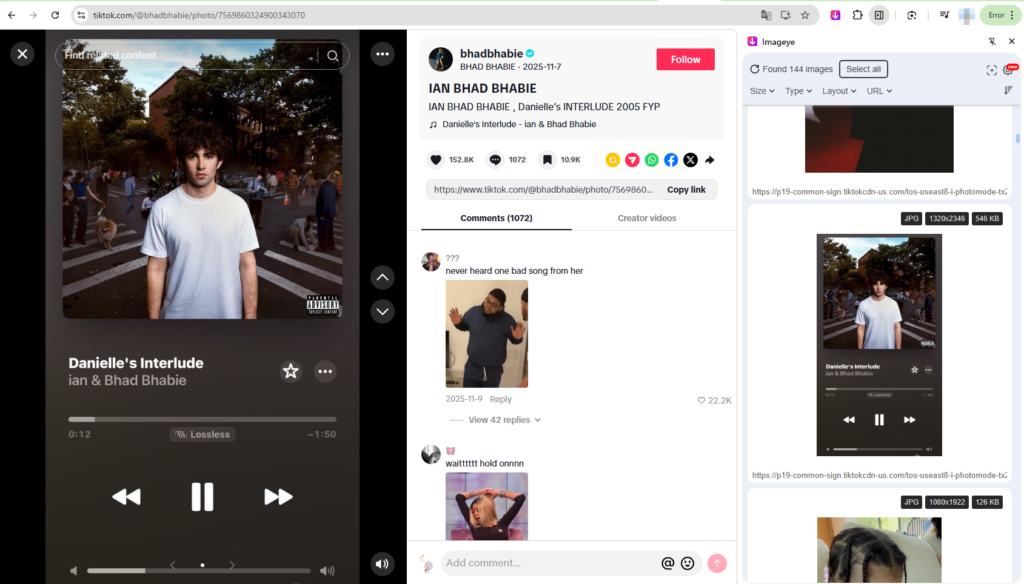
- Install a TikTok downloader extension (e.g. imageye) from your browser’s extension store.
- Navigate to a TikTok slide post and click the extension icon to detect and download images.
Pros:
- Faster than online tools
- Integrated directly into the browser
- Suitable for repeated downloads
Cons:
- Extensions may break after TikTok updates
- Limited support for bulk downloading
- Potential privacy and permission concerns
4. Advanced Bulk Download TikTok Slide Images with Tikget
For users who frequently download TikTok slide images—or need to save multiple posts, full image sets, or entire accounts—manual methods and browser tools quickly become inefficient. This is where Tikget stands out.
Tikget is an advanced TikTok downloader that supports high-quality bulk downloads of both videos and images. It fully supports TikTok slide images (photo mode) and allows users to download all images from a post with just one click.
Key Features of Tikget:
- Bulk download TikTok slide images and videos
- Download all images from a single slide post at once
- Preserve original image resolution
- Support multiple TikTok post URLs
- Organized output folders for easy management
- Fast and stable download performance
How to Bulk Download TikTok Slide Images with Tikget:
- Download and install Tikget on your computer.
- Open a TikTok page that contains the slide images you want to download, scroll page to let Tikget detect and show available images
- Select image download options and output location, then click Save all to download all slide images instantly.

5. Conclusion
TikTok slide images are a powerful content format, but downloading them isn’t always straightforward. While manual saving, online downloaders, and browser extensions can work for small tasks, they often fall short in terms of efficiency, quality, and scalability.
For users who want a fast, reliable, and high-quality solution, Tikget is the clear winner. With its advanced bulk download capabilities and full support for TikTok slide images, Tikget makes it easy to download and manage TikTok content without limitations.
Whether you’re a casual user or a power downloader, Tikget provides the most complete and efficient way to download TikTok slide images—making it the recommended solution for anyone serious about TikTok content downloading.