SnapInsta Review 2026: Features, Safety, and How to Use It

Instagram is packed with photos, videos, Reels, and other visual content that users may want to save for offline viewing, personal reference, or content organization. While Instagram itself offers limited options for saving content, third-party downloaders can provide a more convenient way to save media from Instagram.
SnapInsta is one of the online tools designed for this purpose. It allows users to download certain types of Instagram content by providing a URL, without installing a desktop application. But is SnapInsta safe, what features does it offer, and is it the best choice for frequent downloads? This review explores SnapInsta’s features, safety considerations, advantages, disadvantages, and how to use it. We will also introduce a more powerful alternative for users who need more comprehensive Instagram media downloading capabilities.

1. What Is SnapInsta?
SnapInsta is an online Instagram downloader that allows users to save Instagram media by entering the URL of supported content. Since it operates through a web browser, users generally do not need to install additional software to get started.
Main features of SnapInsta:
- Online downloading: Access the downloader directly through a web browser without installing desktop software.
- Simple URL-based process: Users can copy an Instagram link and paste it into the downloader.
- Instagram media support: The service can be used to download supported Instagram photos, videos, Reels, and other available content.
- Easy interface: Its straightforward workflow makes it relatively accessible for users who only need occasional downloads.
- No complicated setup: There is no need to configure a dedicated desktop application before downloading.
- Multiple-device accessibility: Because it is browser-based, SnapInsta can generally be accessed from computers, tablets, and smartphones.
2. Is SnapInsta Safe?
SnapInsta can be a convenient option for downloading Instagram content, but users should be cautious when using any third-party downloader. Avoid entering your Instagram username, password, or other sensitive information, and be careful with pop-ups, ads, and unexpected redirects. For safer use, access the legitimate website, keep your browser updated, and only download content you have permission to save or use.
3. How to Use SnapInsta to Download from Instagram?
Download Instagram photos, videos, and Reels quickly by copying and pasting their URLs into SnapInsta.
Here are the main steps:
- Copy Instagram URL – Copy the link to the Instagram content (videos, photos, reels or story) you want to save.
- Paste the URL – Open SnapInsta and paste the link into the input box.
- Process the Link – Click the download button and wait for the content to load.
- Download Media – Select the available download option to save the content to your device.

4. Pros and Cons of SnapInsta
Pros:
- Easy to access through a browser
- No desktop installation required
- Simple URL-based downloading
- Convenient for occasional Instagram downloads
- Works across multiple types of devices
- Beginner-friendly workflow
Cons:
- Online services can have advertisements or redirects
- Download capabilities may change depending on Instagram updates
- Less convenient for large media collections
- Manual URL processing can become repetitive
- May not provide advanced organization or batch-management features
- Users have limited control compared with dedicated desktop software
For someone who only wants to download an Instagram photo or video occasionally, these limitations may not matter much. But frequent Instagram users may prefer a more powerful solution.
4. Try the Ultimate Instagram Media Downloader – Insget
If you regularly save Instagram photos, videos, Reels, or other media, Insget provides a more comprehensive desktop-based approach. Instead of relying entirely on an online webpage and processing individual links one at a time, Insget is designed to make Instagram media downloading and management more convenient.
Main features of Insget:
- Grab Instagram photos, videos, Reels, and Stories from profiles in bulk.
- Download media in HD, Full HD, 4K, or its original quality.
- Save videos as MP4 or MP3 and images in JPEG, PNG, or WebP.
- Sort and filter photos by quality and format before downloading.
- Download Instagram media effortlessly on Windows and macOS.
How to Download Instagram Media with Insget:
- Download and install Insget on your Windows or Mac computer, then launch the program.
- Sign in to your Instagram account directly through Insget to browse available photos and videos.
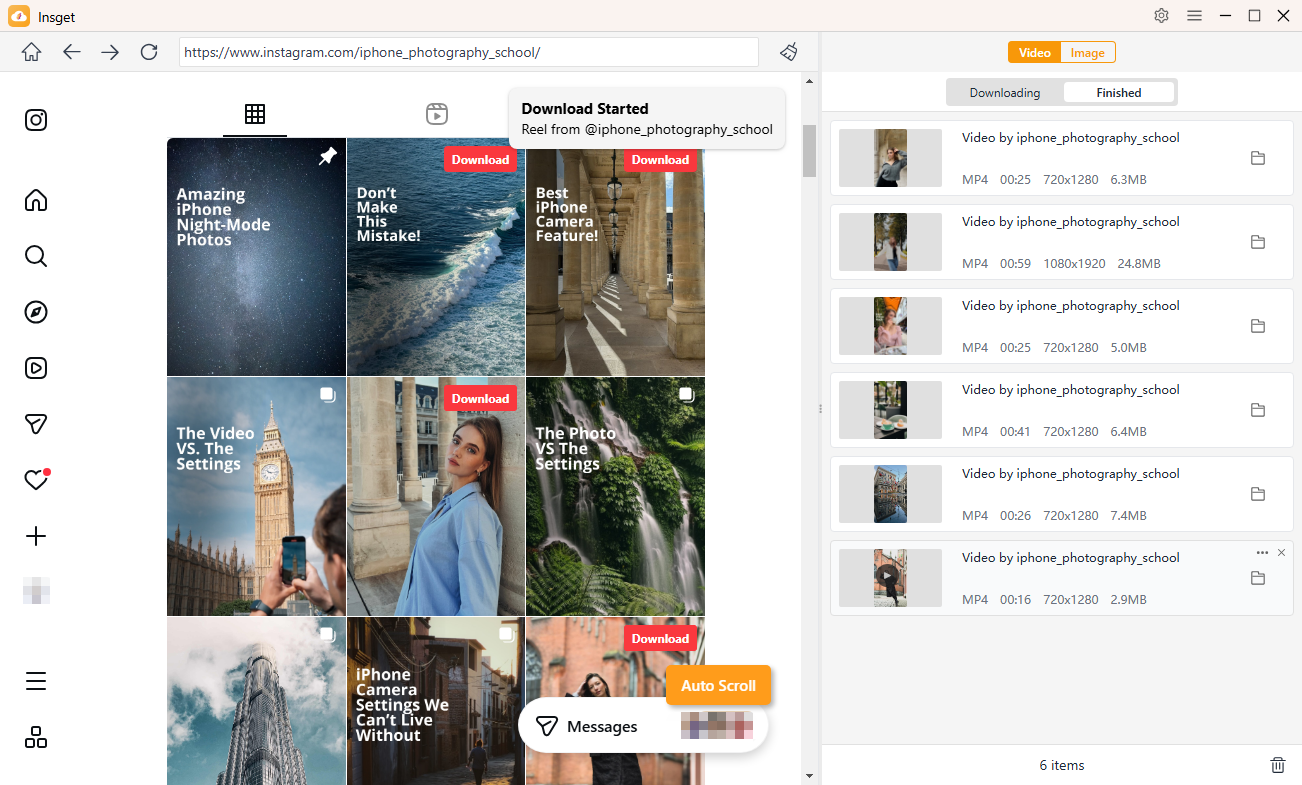
- Play the Instagram video you want to save and click Download to add it to the download queue. Repeat for other videos you want to download.
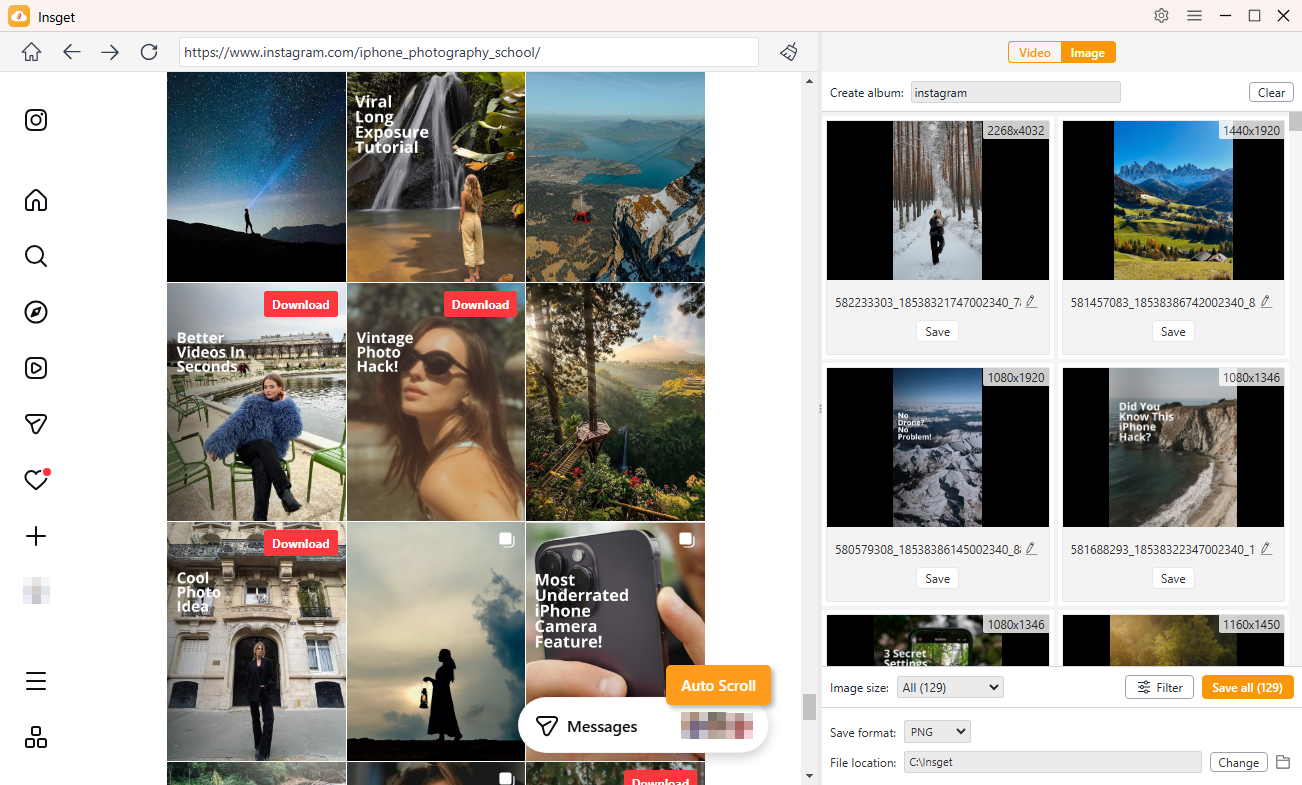
- Scroll through Instagram, and Insget will automatically detect available images. Filter and select the photos you want, then click to save them in bulk.
5. Conclusion
SnapInsta is a straightforward option for users who want a quick way to download supported Instagram content without installing software. Its browser-based design, simple URL workflow, and accessibility make it suitable for occasional downloads. However, online tools can be less convenient when you need to save large numbers of photos and videos or manage downloads regularly.
If you need a more capable solution for frequent Instagram media downloads, Insget is worth considering. With features such as batch downloading, high-quality media support, convenient content selection, and a dedicated desktop workflow, it offers a more efficient way to handle larger Instagram download tasks. For users looking beyond basic one-at-a-time downloads, Insget can be a powerful alternative to SnapInsta.